Showing posts with label iphone. Show all posts

Tuesday, October 4, 2016

Review of SanDisk iXPAND FLASH DRIVE 32G

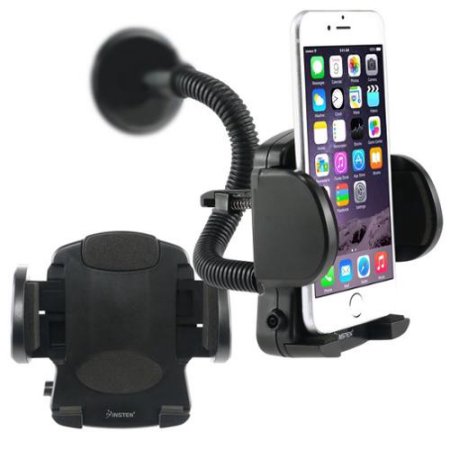
Smart Phone Windshield Mount

Windshield Mount for my iPhone


On my trip to Yosemite and other locations last month, I had got myself a windshield mount for my iPhone from Walmart like the one pictured at left. In a number of my drives over the last year or so (since I started using a cell phone), I've taken photos or even videos while driving. I've done this in a not-so-safe way by holding the phone while driving.

I'd wanted a better and safer way to do this so before heading to Yosemite I picked up this little device for maybe $10 or so. It works really good as long as you mount the phone in the center of the windshield (at least I had to do that in my Explorer). The windshield has too much curvature on the edge near the driver's door.

The only issue I had with using the phone on this device is that you have to reach to the phone to take a picture or start and stop the video capture. But, that takes less effort and is probably less dangerous than also holding the phone while taking a picture or video. I wish I had a voice activation (I wonder if Siri can take a picture?).


Too Many Photos and Videos fill up the iPhone


The other issue I had was that since it was easy to take a video, I found myself taking a lot of videos. I'm sure that none of them are really great but in the heat of the driving moment I found that I wanted to record the entire trip!


Joshua Tree National Park, California
I just have a small capacity iPhone 5 (12G?). I think about 5G is available for images and video. It doesn't take a lot of video to fill up the available disk space. I don't even have many apps installed, nor do I have any music or games, etc. Just a few camera related apps (depth of field calculator, snapseed, etc.) are installed.

I had moved all of the image files off of the iPhone prior to starting my trip. I drove from Phoenix, Arizona to Joshua Tree National Park, California where I spent my first night. The following day I drove to an overlook at Mono Lake near Lee Vining, California. I shot a lot of video of the drive along Highway 395 between Joshua Tree National Park and Mono Lake.

The following day I drove to my campsite at Crane Flat Campground in Yosemite National Park. Again, I shot video and photos along the drive. By the time I got to my campsite in the afternoon I'd basically filled my iPhone. I was already deleting files.


Enter SanDisk iXpand

I have a RavPower device that I can use to transfer files from SD cards to a USB drive. I have used this for my DSLR backup strategy. I thought I'd be able to use it for the iPhone too but it doesn't work. Even though it has a wireless WiFi hub, I don't have any software on the iPhone that will move files to the RavPower. And you can't plug the iPhone in to the RavPower because there is only a single USB connection to the RavPower and that is where the USB drive has to attach. It just won't work. Note: I should have tried to back up the iPhone before leaving home!


SanDisk iXpand
Before leaving on my trip, my wife and I had seen a commercial on television for a device you could plug in to the iPhone which would back up your images. At my campsite I was thinking I should have picked one of those up!

After returning home I decided to get something for that purpose and found out SanDisk has such a device. I ordered the 32G version from Amazon. (As I'm writing this I noticed that the price has gone up from what I paid - I think I paid $39 - my wife actually ordered it with one of her orders - and now it is selling for $41).

If you decide to use one of these you'll want to try it out before getting out of WiFi or internet access because you need to get the associated app from the app store (I assume there's an android version but I've only used the iOS version).

The app is pretty simple but, as with most software these days, a bit cryptic and lacking for instructions. I am not fond of having to poke around software to try to figure out how it works. You can, however, download a PDF user manual (http://downloads.sandisk.com/downloads/um/ixpand-usb3-um.pdf) although I didn't see it listed anywhere in the included brief notes on the packaging, nor in the app itself.


What I think of this device


Once you've installed the app, you plug the iXpand in to the iPhone, and open the app. It does work okay with my iPhone which has a Body Glove Shocksuit case - the device plugs in around the little cover for the Lightning connector.


File names get Changed


You can set the app up to automatically backup your images and videos. When it does the backup, the files are stored in a folder on the thumbdrive especially for backups. The files are copied over and their file names are changed to a cryptic file name such as "6addfec867c382ec-photo.jpeg". You can still see when the images were taken (on Windows 7) so you can still somewhat group them but the iPhone "IMG_XXXX.JPG" file name is gone so you won't be able to sort by file name.

This is irritating to me and I don't see the value. Online they have a lame excuse about iOS using some such name to preserve uniqueness. I have suspected that iOS does some crap behind the scenes before, but even if it does, I wish that SanDisk would use a lookup table or some other way to keep track of the files. I use other software to compare folder contents and it won't work when the file names are different.


Redundant Information in the New File name

Also, what is the purpose of the "-photo" portion of the file name? That is obvious by the extension. And if there are both video and image files in the same folder, they are differentiated by the extension (videos use a "-video" name section along with a ".mov" extension in the SanDisk backup folder).


Copy Function


The app also offers a separate Copy function which allows you to copy files under your control. You can create a new folder and Copy selected image and video files to the thumb drive. When you do this the file names are not mangled. You have the option to select individual files or you can easily select files for an entire day (the day the image or video was shot).

Once the Copy process is finished you are given the opportunity to delete the files from the iPhone.

This is probably how I'll end up using the app and not using the auto backup functionality. The difference is that you could potentially end up with duplicates on the thumb drive because the unique file names aren't used when backing up this way. However, if you do your Copy into a new folder for the selected items and then delete the copied images you shouldn't end up with duplicates anyway and the files will be more organized (at least they will for me).

Missing Auto-delete


I had read somewhere, perhaps on Amazon, that you could also set up the software to automatically delete from the iPhone once a file is copied. This option doesn't appear anywhere in the minimalist app. I think it should be an option. Some folks may only want to back things up but I'm using it to offload images and videos in order to free up space on the iPhone. You can select to do the delete when running the Copy function but not the Backup function.


Bottom Line


I admit to being unimpressed with any iPhone app. I don't like the lack of documentation. I don't like many of the iPhone user controls (I hate the spinner things for selecting a date, for example). I think a lot of software is designed for kids that don't read (either due to lack of ability or patience or desire for information). Okay, I'm part curmudgeon. Probably a large part. But as a software developer and user since about 1980, I expect more professional level documentation and thoughtfulness in design. It's why I'm not a big fan of Google either.

That being said, I also have not been a Western Digital fan for a good number of years. I've tried a number of their hard drives going back to the 1990s and have had a lot of issues with them. For the last 5 years or more I only use Seagate drives because they've never let me down. Western Digital bought SanDisk this year (2016). It makes me question how long I want to keep using SanDisk products. I've used Lexar and SanDisk SD cards - they both get good reviews for quality and dependability - but I may now switch over to Lexar only.

I don't know how much influence the Western Digital people had on the iPhone app and the decisions regarding file renaming, no link to the user manual (why wasn't it included on the thumb drive?), lack of auto delete (with verification prior to deleting). But even if they didn't have anything to do with it I am still not impressed with the software. There was another app on the Apple store that I may look in to regarding using the thumb drive.

The software isn't great but you can offload your images and it does work pretty fast (the interface to the computer is USB 3). For that reason I am satisfied with the purchase. I almost wish I'd gone ahead and got the larger size. I may need to get a second one of these or give this to my wife and get myself the 128G version.


Updates


I did want to mention another option which I may try - you can have your iPhone store image and video files directly on the thumb drive, avoiding the Copy or Backup function altogether. 


October 16, 2016

Angels Window
North Rim of the Grand Canyon National Park
I was looking for my iXpand - I hadn't seen it for a couple of days. My wife was doing laundry and there was something banging around in the dryer. I looked and the iXpand was there, nice and toasty. I had left it in a shirt pocket. It had now been through the wash and the dryer.

I had used it on my trip to the Grand Canyon the prior weekend. When I plugged it in to my PC, everything was fine! Here's a shot from the Grand Canyon North Rim that has been washed and dried! I don't think the image looks that washed out.

Saturday, August 22, 2015

My 2015 Vacation, Part 4 of 7

I woke up fairly early, around 6:00 AM and really felt quite rested. I just love my Exploder! I’d driven about 810 miles the day before and then slept in her quite soundly! I re-arranged some items then punched in a search for a McDonalds in the GPS and headed about a mile to get a #10 with a large coffee (2 breakfast burritos and a hash brown – my usual when I’m out). I sat in the parking lot and posted my status to Facebook at 6:36 AM, which includes their location and address. It gives them advertising, I suppose, but I have really grown fond of the free WiFi at McDonalds.


I-5 northbound near mile 652
I often go to McDonalds just because I know I can use their WiFi. I go through the drive through then sit in the parking lot as close to the building as I can get (so the signal is as strong as possible) and then uploaded some pics. I did run across one McDonalds somewhere that didn’t have WiFi or it wasn’t working (I don’t remember where exactly, perhaps Seaside, Oregon). On the other hand, they seem to have my fast food breakfast of choice. The 2 burritos usually last me until late in the day. Sometimes I’ll also grab a large orange juice. I guess that’s enough about my poor eating habits for now…


TA Truck Stop, I-5 at exit 673
I headed on up Interstate 5 towards Redding. I fueled up at the TA truck stop at about 8:00 AM. This was the place I’d hoped to sleep at the previous night. It looked like it would have been fine. The truck parking lot is in back of the building and fairly secluded. There were a few other cars in there. I also got myself some more jerky and ice for my cooler and then headed into Redding. I’ve been in Redding a few times before, mainly to buy gas and I may have stayed in a motel there (it was either there or Red Bluff). But I hadn’t seen as much of the downtown area as I did this time. I had to snap a picture or two on the iPhone.


Redding
I was hoping to take highway 299 from Redding to the California coast near Eureka. Unfortunately there were a lot of fires burning in that area and the highway was closed. Jill (my GPS) guided me back to the freeway over a different route so I got to see even more of Redding. I like it there. It’s nice and woodsy, with winding streets instead of straight streets that stretch for miles on a desert floor. I think this was when I started wondering about moving back to the northwest.


I headed on up I-5, and was shocked when I saw the water level in Shasta Lake. I knew it was down and had seen pictures of it but it’s quite different to see in person how little water is in there. There were boat ramps that end half way down the bank without touching the water at all. I didn’t see one boat on the lake. It used to be like Lake Powell or Lake Pleasant in the Phoenix area are still. Very active for water sports and fishing.

One thing new for me on this trip, using my GPS, was that I got notices of bodies of water and places from interest in real time as I was driving. I decided to take exit 702 to see Antlers Campground (a USDA Forest Service campground) (http://www.fs.usda.gov/recarea/stnf/recreation/ohv/recarea/?recid=6421&actid=29) and perhaps get a picture of the lake at that point. This is just south of Lakehead-Lakeshore, CA.

Explorer goes exploring
I found a utility road for power lines and drove down it, pretending I had a 4 wheel drive. It wasn’t too bad but the road was pretty uneven in a few places and the Exploder was at a fun angle or two! I got out to scope out the area to see if I wanted to FINALLY get out a Nikon camera. I walked around and ended up shooting a good number of pictures on the iPhone, around 60 in fact. Again, I decided not to bother with the Nikons.

Wild Horses, Sacramento Arm of Shasta Lake
The lower number of shots made with the Nikons was a surprise to me. I read a lot of Thom Hogan (http://bythom.com/) and that’s one thing he harps on a lot – that smaller cameras are just easier and more convenient. After this trip I believe him more. I still felt, and feel, that when I want a picture I can print big or do post processing on, I need to use a DSLR. But for mid-day shots that are basically snap shots and recording an event, the cell phone works fine. I ended up shooting 1,699 images and videos on the iPhone and there may be a dozen or so that I wish I’d taken on my Nikon. Note that I did also take another 1,344 pictures on the Nikons which I considered to be of better quality (at least that was the intent).


Bear scat
One of the cool things about the iPhone is that I felt pretty comfortable using it while driving. I wouldn’t think of using one of my Nikons in the same way. And I enjoyed having the iPhone in a restaurant or store or other building. I don’t feel the same way about the Nikon. I felt like it was more acceptable to look like a simple tourist using an iPhone that to try to drag a Nikon and tripod around. I really like how the two systems complement each other. And how else can I as easily take a selfie of my with my Nikon?

I found some wild horses (at least I assume they were wild) at the bottom of the cliff that the utility road ends at. They were roaming and grazing where there used to be a lake. I found some bear scat on the trail. I thought it was bear and took a picture of it that was later confirmed to be bear by some park rangers in Oregon. Another use for the iPhone!

I got back in the Exploder and continued my trek north. I didn’t get very far before I noticed that Jill the GPS was showing me there is a river running alongside of I-5. All of those trips in the past and I’d never known about the Sacramento River that I-5 follows from Lakeshore-Lakehead about 50 miles to about Dunsmuir. I couldn’t ignore it so I pulled off the freeway at exit 718 and drove down to the Sims Flat Campground (a USDA Forest Service campground).


Sacramento River at
Sims Flat Campground
This was a very pretty river and a very peaceful spot. I did get out my Nikon D3200 here, and the tripod. The only drawback was that it was the middle of the day (about 11:00 AM) and it wasn’t really that great for shooting. I got some pics that are representative of what I saw.

I met a Viet Nam vet and his grandson who were riding their mountain bikes around. He’d been going there since the 1960’s. He had relatives that owned property around the area; he was RVing from San Diego. I talked to him for close to an hour about the area, San Diego, the drive in California, the USS Missouri (he had a relative on there, I followed it out of the northern Persian Gulf during the first Gulf War), the state of the military, and how much he thought I should join the VFW. Eventually we parted but I think we could have talked well into the evening!

The encounter is another reason I love taking any of my photographic excursions. Rarely do I meet people who want to talk about cameras but I often meet other travelers that are willing, perhaps wanting, to also meet someone new and share some time together. It’s really nice to get to know someone even briefly when you’re surrounded by some beautiful scenery. I think the scenery helps put you in a good mood, and makes you more receptive to conversation with strangers when you’re both experiencing the beauty together.

Black Butte near Mt. Shasta
I had really wanted to get some pictures of Mt. Shasta on the trip but due to the fires you couldn’t really see it from the highway at all! The veteran showed me one of the bridges at the campground that actually looks right up at Mt. Shasta, and told me it is a very popular shot. I didn’t get to take it due to the smoke (I could barely make out the mountain at all) but here’s a link to someone else’s shot so you can see what it looks like from the camp ground:(https://hikemtshasta.files.wordpress.com/2013/04/trinity-divide-sacramento-river-feb2013-046-copy-custom.jpg).


A Knight truck on I-5 north of Grants Pass, Oregon
I eventually saddled up again, and crossed in to Oregon at about 12:51 PM. I exited I-5 in Green, OR at exit 119, a bit south of Roseburg, and fueled up and did some reconnoitering. I decided to continue along highway 42 to Coos Bay or Charleston and that I would begin my Oregon coast travels there. I figured I’d be able to find a motel or campground there.

I had driven that road only once before, when I lived in Coos Bay and had to go to a meeting in Roseburg. Roseburg is a weird place to get to from Coos Bay – there are two main routes but either one causes you to backtrack north or south. But I’d done the northern route a lot so decided to stick with the southern road through Winston and Coquille.


Highway 42
It doesn’t take long after you get off the freeway to start seeing western Oregon as it typically presents itself. Sparse communities that are primarily built on the logging industry, situated in forests that alternate between lush and harvested. I wish I was more poetic because I don’t feel I’m painting a sufficient picture. It’s just the kind of area where you are immediately faced with the reality that not everything in the world is concrete and steel and asphalt and it even seems like the people, too, are not made of concrete and steel but instead of flesh and bone and compassion and patience and joy. But then that’s how it is in the northwest.


Downtown Coos Bay, OR
Eventually I made my way through Coos Bay at about 4:46 PM, and then on in to Charleston, Oregon which is about 10 miles further towards the coast, through Empire. I took pictures with the iPhone as I went through Coos Bay of the street that I used to work on, of the building I used to give guitar lessons in, and the downtown intersections in general. I took some pictures of the bay itself (the name is, you guessed it, “Coos” bay). However not many of these turned out since I still didn't know how to cause the phone to focus. I think it was focusing on some of the dead Oregon bugs that were decorating my windshield by this point.


Capt. Jacks Motel, Charleston, OR
I had never stayed in Charleston before so I had Jill the GPS look for a motel and she guided me to Captain Jacks Motel. How could you go wrong with a name like that in the fishing town of Charleston? As it turned out they had one room left and I took it. The pointed me to a nearby place to get some seafood, within walking distance. I unloaded some of the Exploder and set my sights on the Portside Restaurant. I walked over, breathing deeply the sea smells, and ordered a huge seafood platter. It was enough for 2 or 3 people!

Seafood Platter at Portside Rest.
It was really good but I ended up eating maybe a third of it. I had even ordered rice instead of the huge, loaded baked potato! I really wish they'd had a smaller platter. I hate wasting meat, knowing those animals gave up their lives for a human and then the human didn't even eat them.

I had to do it - I took pictures of the meal and posted them to Facebook! My wife was very jealous and was wishing she was there too (and I wished she was as well). I also took some pics out of the restaurant window to post, showing a different landscape than I typically post from Arizona.

Bed selfie with my Kindle
I ended up taking a few more iPhone pics but, feeling a bit tired, I (regretfully) blew off going to Sunset Bay for a sunset picture shoot and instead warmed my belly a bit more with some Johnny Walker and went to bed at about 8:30 PM. Yeah, just like a senior citizen, but I was just thrilled and relaxed to be at the Oregon coast and that night I just didn’t care about anything else!


Click here for the next installment...